
Go to the portfolio creation generator.doragorack.com/portfolio-en
(For returning customers) Create now
This tool requires no login and is completely free.
No specialized knowledge required.A three-dimensional display space directly connected to an EC site.
Add a stylish space-type gallery to your own site with a single piece of code. This is the official site of “DORAGORACK.” There is no hassle of membership registration or login. After uploading product images with transparent backgrounds, just intuitively drag them with your mouse and place (fix) them in your preferred location. Without any specialized knowledge, you can build a three-dimensional display space directly connected to an EC site on your website. First, please check the design right on the spot with the free preview function.
1. (1 and 2 are free) [Choose a background image and upload your registered product images] 1500x1500px or less (up to 1700px for vertical products) with a transparent background will blend nicely into the room.
2. [Place by dragging] Move it to your favorite place (such as a table or wall) with the mouse, and finally fix the position.
3. [Just paste the code] When completed, enter the password purchased on BOOTH to issue the code. Just paste it onto your own site to complete.
🪟3 template rooms to match your brand styleChoose from three distinct spaces to perfectly fit your store’s image: “White” for a clean, minimalist look; “Natural” featuring blue accents, warm wood, and beautiful indoor plants; or “Fancy Pink” to bring out a charming and cute vibe
.💟 Commercial-use backgrounds with zero copyright worriesAll provided background images are original works that have passed strict review processes on global stock platforms. They are fully authorized for commercial use, allowing you to build your store with complete peace of mind and zero copyright issues
📋 Easily restore and edit your entered image URLs with a simple copy and paste. When updating your store, just paste your previously generated code into the box to instantly redisplay the product names, image URLs, and links. From there, simply reposition them to quickly and easily make changes or updates.
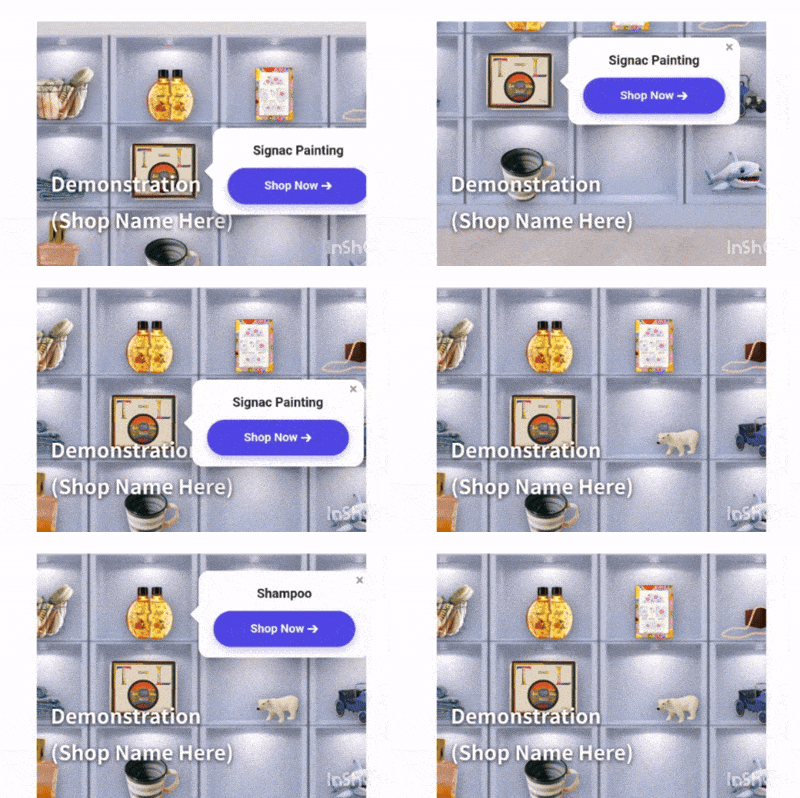
[How to use the Demo]
*Pinch or scroll to zoom in and navigate the room freely.
Explore the space and touch the pins to check out the products!
(For pins on the far right, zoom in deeply for a better view.)
Get started now
No login required. Generate code completely free of charge.
[Usage Notes (Disclaimer)]The copyright for the images and product information displayed on this system belongs to this site or the respective rights holders. Please refrain from saving or reposting this content without permission.Please note that this site assumes no responsibility for any trouble or damages arising from the use of this system.
[Recommended Environment]DRAGORACK supports the latest versions of major modern browsers (Google Chrome, Safari, Microsoft Edge).
■ Generator (Creation Tool / Management Dashboard)・Recommended: PC (Windows / Mac)*We recommend using a PC, as the process involves detailed editing tasks such as dragging and dropping pins onto the background image and entering text.
■ Output Virtual Store (Shop View)・Compatible with both PCs and smartphones (iOS / Android)*The “speech-bubble price tags” that snap precisely next to the pins function smoothly on smartphones as well (movement becomes fluid after zooming in once).
[ Support the Creator / Donation ]All tools on this site are completely free to use. If you find them helpful and would like to support future development and server maintenance, donations are highly appreciated!We use “BOOTH,” a secure Japanese marketplace, as our donation platform. As a small token of appreciation, you will receive a “Transparent Background Image Manual (PDF in 3 languages)” which provides helpful tips for using this tool.Support with 100 JPY (Go to BOOTH)💡 Easy Login:To complete the checkout, you can instantly sign in using your existing Google, Apple, X (formerly Twitter), or Facebook account—no need to create a new password. It is fully accessible for international users!*If you wish to donate more, you can freely increase the amount using the “BOOST↑” option at the final checkout screen.*