📢 Notice from DORAGORACK
Next scheduled password update: [ Month12/Day16, 2026 ]
(*Starting 5 days prior to the update date, a bonus set containing both the old and new keys will be distributed on BOOTH.)

Go to the portfolio creation generator.doragorack.com/portfolio-en
(For returning customers) Create now
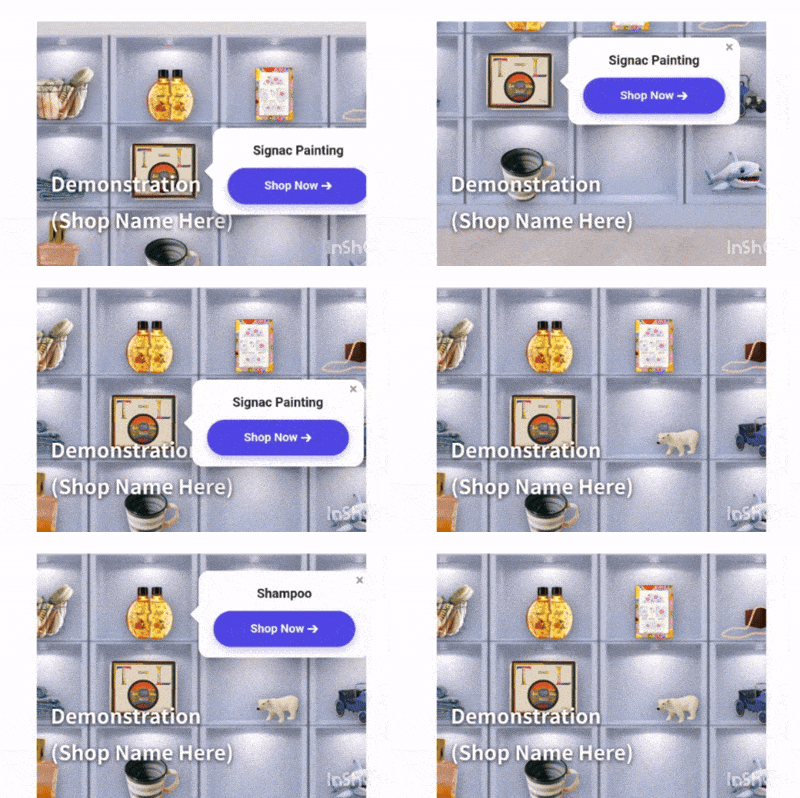
Add a stylish space-type gallery to your own site with a single piece of code. This is the official site of “DORAGORACK.” There is no hassle of membership registration or login. After uploading product images with transparent backgrounds, just intuitively drag them with your mouse and place (fix) them in your preferred location. Without any specialized knowledge, you can build a three-dimensional display space directly connected to an EC site on your website. First, please check the design right on the spot with the free preview function.
1. (1 and 2 are free) [Choose a background image and upload your registered product images] 1500x1500px or less (up to 1700px for vertical products) with a transparent background will blend nicely into the room.
2. [Place by dragging] Move it to your favorite place (such as a table or wall) with the mouse, and finally fix the position.
3. [Just paste the code] When completed, enter the password purchased on BOOTH to issue the code. Just paste it onto your own site to complete.
📣[ About Logging in / Creating an Account on BOOTH ]Our tools and tickets are processed through the external platform “BOOTH.”Even if you do not have a pixiv account, you can easily log in instantly using your existing Google, Apple, Facebook, or X (Twitter) account without needing to create a new one from scratch.
Come experience the shop!
Upload one or two photos and try out the tool for free! (For PC)
Uploading product images and viewing the preview is free. [How to generate the code]To export (output) the completed integrated HTML code, you need an unlock passcode (key).Please purchase the “Ticket with Passcode (JPY 700)” on BOOTH and enter the password into the input field at the bottom of the generation tool.
[Recommended Environment]DRAGORACK supports the latest versions of major modern browsers (Google Chrome, Safari, Microsoft Edge).
■ Generator (Creation Tool / Management Dashboard)・Recommended: PC (Windows / Mac)*We recommend using a PC, as the process involves detailed editing tasks such as dragging and dropping pins onto the background image and entering text.
■ Output Virtual Store (Shop View)・Compatible with both PCs and smartphones (iOS / Android)*The “speech-bubble price tags” that snap precisely next to the pins function smoothly on smartphones as well (movement becomes fluid after zooming in once).